What's new
Aloft Forums

Welcome to Aloft Forums. Register a free account today to become a member! Once signed in, you'll be able to participate on this site by adding your own topics and posts, as well as connect with other members through your own private inbox!

Telemetry sensors no longer working after update to 2.3.14

bmw2go

New User
I have a Horus X10S running OpenTX 2.3.14. After updating to this version, my voltage sensors and ALT sensors are no longer giving me a readout from the radio. Your help is MUCH appreciated. Ron
 
Go to the Telemetry page and rediscover sensors, you may need to update the sensor source settings.
 
Go to the Telemetry page and rediscover sensors, you may need to update the sensor source settings.
Hi Henny - thank you for reaching out. I tried the rediscover sensor and did not see any change. I then deleted all sensors and then retried the rediscover sensor and that did not work. This is assuming I am performing this task correctly. Any other thoughts??? Thanks again!
 
So when you updated you radio OS how did you actually perform this. Did you also update the SD card contents. Do you get any warnings when you turn the radio on.

Long press the SYS key and page forward to the version menu, what version of firmware does your radio indicate it is running. The VERS line is you current version.

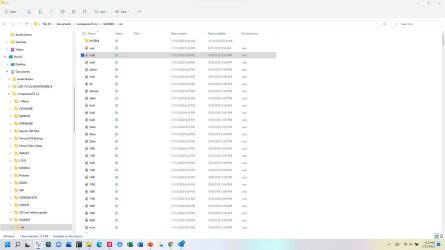
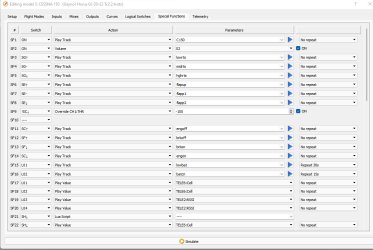
Also long press the SYS key, press the page button once, you should see the folders, navigate to (SOUNDS) click the scroll wheel and you should see "en" meaning english click on this folder and ensure you see a SYSTEM folder and all of the sound wave files. Next click ( short press) the MDL key page forward to SPECIAL FUNCTIONS what do you see.
Greetings - I updated the radio OS and it correctly reads vers: 2.3.14-otx. I also updated the SD card to ver 2.3v0038. All my sound files are loaded in the sound file and everything appears to be set up correctly in the Specia Function tab. When I hit my momentary transmitter switch to get a sensor readout, it tells me that the cell count is "0". I also get a low battery warning as if the sensor is not plugged into the lipo balance plug. I normally can figure out things that might or have gone wrong with the radio or programming, but I am at a total loss on this one.

Would you by chance be available to discuss further via a phone call? My number is 678-457-0205. I am more than willing to pay for your time as I really need to get this working. Thanks agaib! Ron
I,m a long way away, in Australia. Perhaps try Aloft first. Could always try ZOOM?
 
WOW- I thought you were here in the US. I could always send you a zoom meeting request if we could work out the time zone difference. There is a 4 or 5 hours difference between there and here :-( Anyway - do you have any other ideas of what I could try?? Thanks so much again - Ron
 
Can you take a picture of both your special function page and the directory containing the audio files. Yes you guys are 5 hours ahead and a day behind.
 
Can you take a picture of both your special function page and the directory containing the audio files. Yes you guys are 5 hours ahead and a day behind.
Attached are the screenshots requested. I also attached a backup of my plane files should you want to load them in your Companion TX software. Thanks again, Ron
 

Attachments

  • Sound Directory.jpg
    Sound Directory.jpg
    119.8 KB · Views: 203
  • SpecIal Features Page.jpg
    SpecIal Features Page.jpg
    189.4 KB · Views: 212
  • Gaynor Horus 02-20-22 Tx2.2.4.otx
    Gaynor Horus 02-20-22 Tx2.2.4.otx
    17.8 KB · Views: 212
OK looks simple. To play a value you don't need a logical switch. A logical switch set's up a trigger point. So to play the RSSI value like you have in SF19 replace LO3 with a switch, for instance in an electric model use the throttle protect switch. In IC model you could use the the inverted throttle kill switch. If you turn repeat on the radio will announce the RSSI value every 30 seconds if that's what you want. Normally a Logical Switch when true will only play a track.
 
OK looks simple. To play a value you don't need a logical switch. A logical switch set's up a trigger point. So to play the RSSI value like you have in SF19 replace LO3 with a switch, for instance in an electric model use the throttle protect switch. In IC model you could use the the inverted throttle kill switch. If you turn repeat on the radio will announce the RSSI value every 30 seconds if that's what you want. Normally a Logical Switch when true will only play a track.
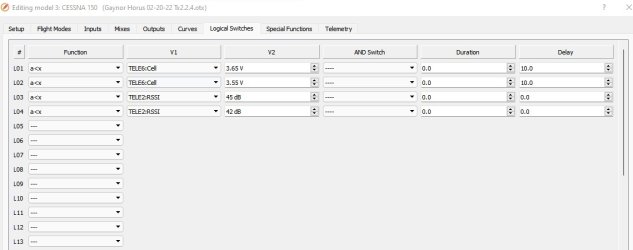
Hi Henny - I am not questioning your solution, but do need to let you know that I have been using this programming setup from day one and it has always worked - up until now. I have my telemetry set up to automatically read out when the limit points are reached (i.e - low cell count or low RSSI) I also have my momentary switch (SH) set up to give me telemetry readout when the switch is triggered. Attached is a screenshot of my Logical Switch page. Please let me know if you still think I need to make a change - thanks.
 

Attachments

  • Logical switches.jpg
    Logical switches.jpg
    70 KB · Views: 207
OK so the RSSI will automatically warn you as long as the values are set in the Telemetry screen to the 45 and 42 for ACCST and 35 and 32 for ACCESS. The cell value will only occur once the low value is reached with a logical switch and after a further 10 sec delay and then only once unless you turn repeat on. I like to know how my flight pack is doing while flying so get a constant readouts every 30 secs. You can use a debugging process to see where the read outs are not working. So in the Logical switch page if you increase the cell V2 voltage above the current cell voltage the LS should close as indicated by that switch line (LO1) will become bold. So then you know that first step is working. Then move to the next step being the special function page etc. One more tip when programming Special functions you will see the LO1 in the switch line. If you scroll thru the available switches you will also find a -LO1 this is the inverse of LO1.
 
Last edited:
Back
Top