What's new
Aloft Forums

Welcome to Aloft Forums. Register a free account today to become a member! Once signed in, you'll be able to participate on this site by adding your own topics and posts, as well as connect with other members through your own private inbox!

Separate Elevator/ Aileron D/R’s on Elevon mix

I tried digging through here to make sure I’m not asking something that has already been covered.

I have figured out how to set up d/r and expo’s on a switch in the input screen, and inserting a new line for each switch position etc.. Would I still go this route for an elevon type wing? I would like to separate the Elevator d/r from the Ailerons. I am not having luck haha, Do I need to do this on the mix screen since I’m trying to set a d/r switch on a mix?

Also I found a template online that somebody had setup aileron differential to be adjusted via the rudder trim as well. Unfortunately I don’t have a way to download the template so I was hoping someone might know how to go about this?

I appreciate the help, thank you.
 
Your D/R mixing will still be on the input screen, just as you described. Your actual mixing should be on the mixing tab, so your inputs page should simply have the basic four channels, which you can add separate dual rates for each one in the manner you described.

To make the differential adjustable by the trim, you will firstly want to turn the trim off for the corresponding channel (I use rudder, you can also use throttle trim on a 4 channel aircraft), then go over to your mixes page.

Go to the channels you'd like to add differential to, and then go down to curves, where is should read "diff." Scroll over to the value, then long press, and change to "GV1." This is a global variable, basically a variable input that you can configure elsewhere.

Do this for both your aileron/elevon channels. If you need to reverse one of the GV values (which you usually do), this is where you would reverse it. (Just scroll backwards to select "-GV1."

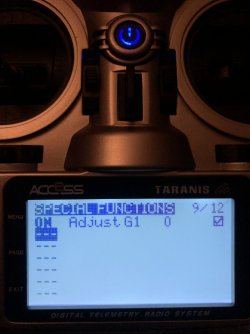
Go to the special functions tab, and create a new function. When it is on the source select, keep scrolling until you find "ON". It is towards the end and will keep the special function active at all times.

Scroll through the functions until you find "Adjust." Then select "GV1". On the next column select your trim as the source. Then select the box in the final column and you are pretty much done.

Check your control surfaces before flying (I hold full aileron/elevon, then adjust the trim). If nothing happens, or if both surfaces move as you are adjusting the mix, you need to reverse one of the differential "GVs" as I mentioned earlier.
 
I too have been forced to move to the M1 chip. This is driving me to look for a lot of USB-c cables and adapters. I at times wonder if Apple has lost its focus on the concept of human (humane) interface. This was what separated Apple from the others. I bet Jef Raskin is roll in his grave at how far the Macintosh has moved from a tool to aid one’s life to one that often limits and oppresses.
 
Last edited:
Your D/R mixing will still be on the input screen, just as you described. Your actual mixing should be on the mixing tab, so your inputs page should simply have the basic four channels, which you can add separate dual rates for each one in the manner you described.

To make the differential adjustable by the trim, you will firstly want to turn the trim off for the corresponding channel (I use rudder, you can also use throttle trim on a 4 channel aircraft), then go over to your mixes page.

Go to the channels you'd like to add differential to, and then go down to curves, where is should read "diff." Scroll over to the value, then long press, and change to "GV1." This is a global variable, basically a variable input that you can configure elsewhere.

Do this for both your aileron/elevon channels. If you need to reverse one of the GV values (which you usually do), this is where you would reverse it. (Just scroll backwards to select "-GV1."

Go to the special functions tab, and create a new function. When it is on the source select, keep scrolling until you find "ON". It is towards the end and will keep the special function active at all times.

Scroll through the functions until you find "Adjust." Then select "GV1". On the next column select your trim as the source. Then select the box in the final column and you are pretty much done.

Check your control surfaces before flying (I hold full aileron/elevon, then adjust the trim). If nothing happens, or if both surfaces move as you are adjusting the mix, you need to reverse one of the differential "GVs" as I mentioned earlier.
So the issue that I am having when I add d/r lines to either the aileron ch or elevator ch. it’s only applying to that ch, not the mix of the two. I feel like I might be missing something. Do I add the d/r lines on both the input screen and the mix screen? 🤔
 
So the issue that I am having when I add d/r lines to either the aileron ch or elevator ch. it’s only applying to that ch, not the mix of the two. I feel like I might be missing something. Do I add the d/r lines on both the input screen and the mix screen? 🤔
I think I see your issue. Just like you create your new rate by copying the input on elevator for example, you do the same for aileron and simply put the rate selection on the same switch
 
I think I see your issue. Just like you create your new rate by copying the input on elevator for example, you do the same for aileron and simply put the rate selection on the same switch
So I have different values as far as d/r &expo for my elevator and aileron. I was hoping that this would apply to the mix. Im having trouble wording it properly. When I am moving the switch I have the d/r assigned to it’s only applying it to one half of the wing. So instead of having only 70 d/r for the elevator function Of the elevon it’s just the elevator servo and I have whatever my aileron d/r is at for the other servo. Instead of the elevator rates applying to both servos in unison as they are mixed? I hope I’m not being too confusing
 
Maybe this helps.
C2360096-63C6-4BB3-BF31-480B6AB65D4E.jpeg
D3E44C98-B85B-47D9-AD2F-895209EE3056.jpeg
 
So I have different values as far as d/r &expo for my elevator and aileron. I was hoping that this would apply to the mix. Im having trouble wording it properly. When I am moving the switch I have the d/r assigned to it’s only applying it to one half of the wing. So instead of having only 70 d/r for the elevator function Of the elevon it’s just the elevator servo and I have whatever my aileron d/r is at for the other servo. Instead of the elevator rates applying to both servos in unison as they are mixed? I hope I’m not being too confusing
Ah, I think I got it now. While mixing as elevons, your D/R only applies to one servo (ie when you added rate to your elevator it added it to what is normally just the elevator servo on a standard configuration aircraft). I'm looking at my mixing right now and they are identical in all ways except that I have two Elevator mixes with aileron added underneath both of them (identical looking mixes with some switched directions to compensate).

Out of curiosity, what OTX version are you on?

For the latter issue, scroll over to that "0" on the special functions row and long press. You can then select "Mixer source," then eventually the trim. (I have a little pop-up, if you're running older OTX it may not be there - I'm not certain).
 
I am on version 2.3.14 I’m pretty sure it’s the most recent.

So on my mixing screen I should create two Elevators then add the mixed Aileron under them?

I was able to set the GV to the trim! You have been very helpful thank you!
 
Perhaps I am missing something, but this would be like a V-tail versus T-tail. The dual rates should be applied to the inputs, and the mix lines are setting the amount each input applies to each output. I am not understanding how an input weight change only affects one servo. Could you share your model file?
 
Perhaps I am missing something, but this would be like a V-tail versus T-tail. The dual rates should be applied to the inputs, and the mix lines are setting the amount each input applies to each output. I am not understanding how an input weight change only affects one servo. Could you share your model file?
I had a mix from elevator to aileron, then aileron to elevator. Once I changed it to elevator to aileron and elevator to aileron again it solved this issue.
 
Back
Top