What's new
Aloft Forums

Welcome to Aloft Forums. Register a free account today to become a member! Once signed in, you'll be able to participate on this site by adding your own topics and posts, as well as connect with other members through your own private inbox!

Problem with Horus X12S "defective antenna message"

Raymond Gaskins

Very Strong User
Reaching out to the Horus X12S experts/users. I have several X12S Tx's in which I have done the ISRM Access upgrade boards (for the 10SExpress, but work with the X12S) and have had no problem with the upgrade installation and have upgraded all to the latest version of ISRM firmware and upgraded all to OpenTx 3.1.11. I recently purchased anothe HorusX12S from HorusRC which I ordered with the ISRM upgrade installed but came with FrOS (even though the HorusRC website stated it came with OpenTx installed). So, I installed reflashed with OpenTx 3.1.11 and then went into the model menu and turned on the internal module and noted that ACCESS was now available as an option. However, the radio almost immediately gave me an audible warning that sounds like "defective antenna" and a warning popped up "Tx antenna problem." Every few seconds the warning (both audible and visible would sound). I rebooted the transmitter several times and the warning did not clear. I, then, went back into the model menu (only have the OpenTx model1, so far, and no information placed in this) and turned off the internal antenna option. Then shut down the transmitter and rebooted it and no warnings appear. So, it appears the radio was shipped with all antennas turned off and there is a defective internal antenna. I then removed the back, disconnecting the battery first and unplugged all necessary connections and carefully examined the internal antenna connection to the back of the upper case and to the small coax plug on the upper board in the front half of the radio, cleaned off the hot glue on the connections, carefully removed the connection on the upper board and reinstalled the antenna connection. I then reassembled the radio and this did not clear the problem and the warning still sounds unless the internal antenna is deselected in the model menu. I suppose I could return the radio to the HorusRC company, but I would rather repair it with a new antenna to see if that will fix the problem. Does anyone know of a source for the internal antenna?
If Wayne happens to read my post, does Aloft still have parts to repair the "defective antenna"?
Thanks for any and all who may be of help.
Raymond Gaskins
 
What version of the ISRM does the internal module have. It needs to be v2.1.0 I had the same antenna error with my X10S Express before flashing the ISRM module. There could also be a defective antenna but I would check the firmware first.
 
The radio was purchased from HorusRC had the ISRM board installed and I assume it has the latest ISRM version (v2. 1.6); thanks for the tip. I will reflashwith v2.1.0 and see if that fixes the problem.
Thanks,
Raymond Gaskins
 
So, I deleted the factory installed ISRM (v2.1.6, I think, although I could not find a way to actually view the installed version) and downloaded ISRM-S-X10E_2.1.0.frsk and placed it in the FIRMWARE folder of the X12S SD card. I then turned on the tx in bootloader mode, but the only visible file was the .bin file with OpenTx that I had previously downloaded and flashed when replacing the factory installed FrOS. So, no way to select the ISRM file from bootloader view. I then turned on the transmitter in the usual fashion and long-pressed the system button and found the SD card and opened it and the ISRM file was there. I then selected this and selected the option to flash the memory but kept getting the message "Firmware update err" Device not responding. I did this several times to verify no step was missed and got the same error. Previously, when I had updated the ISRM card I had upgraded in my other X12S's, I was able, as I recall, to see the ISRM when I turned on the Tx in bootloader mode. I have no idea why this is not working, but would appreciate any help you or others might give.
I hate to return the Tx to a service center, unless I really need to and may have voided the warranty by opening the case, as I mentioned in my original post in this thread.
Thanks for any help you might render.
Raymond Gaskins
 
Hi Raymond. Can you confirm the X12s you purchased is the new one fitted with ISRM and loaded with Ethos firmware. When you say you flashed the radio with OTX v3.1.11 do you really mean OTX 2.3.11

One more point the Internal module (RF module) in the updated transmitters does not support the version V2.1.6 intended for the Express version of radios. The read me file clearly states this.

So what version have you flashed to your X12S and did it come with Ethos already loaded.
 
Last edited:
What version of the ISRM does the internal module have. It needs to be v2.1.0 I had the same antenna error with my X10S Express before flashing the ISRM module. There could also be a defective antenna but I would check the firmware first.
Henny,
I see you are on the forum now; when you get chance, please read my additional information above in response to your question and advice.
Thanks,
Raymond Gaskins
 
Hi Raymond. Can you confirm the X12s you purchased is the new one fitted with ISRM and loaded with Ethos firmware.
The X12S I purchased from HorusRC was updated with an ISRM board, but had the FrOS operating system when I received it. I installed OpenTx 3.1.11.
 
Which version of the X12S did you order the EU version or the non EU version. Horus indicated it ships the new X12S with ETHOS fitted not FRos.
 
Which version of the X12S did you order the EU version or the non EU version. Horus indicated it ships the new X12S with ETHOS fitted not FRos.
Sorry for the typo, OpenTx v 2.3.11 (latest); X12S was the FCC version and it came with FrOS, not ETHOS. Actually would like to play with ETHOS when I have time, but now trying to become more familiar with OpenTx, as I am a newbie, but am 71 y.o. and really like tinkering with stuff. OpenTx is really what I have dreamed about in the 50+ years I have flown RC. Recently (past 10 years), have been a JR user, but want to move on to the OpenTx platform. I cannot get the ISRM v 2.1.0 to show up on the SD card when I turn on Tx in bootloader mode, although it definitely shows up in the FIRMWARE folder on the SD card when I turn on the transmitter the usual way and go to a long push for system and look in the FIRMWARE folder. Got error message as noted above when I tried to flash from there.
Raymond Gaskins
 
OK to flash the ISRM module on your X12S requires this version of ISRM firmware attached. The Express radios are running a high speed bus so the ISRM for the Express radios wont work.

So unzip this file and copy it to your X12S. I dont have the X12S but I understand this X10 version will work as the upgraded board is the same for both the X10 and X12 radios.

Once its copied to the SD card you flash the ISRM (NOT IN BOOTLOADER MODE)
With the radio powered on press the system button.
Navigate to the ISRM file press the enter button,
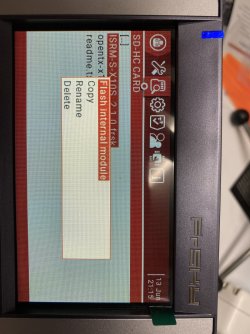
press and it will ask flash internal module
Press enter flash should start.
It will indicate once its done.
 

Attachments

Henny,
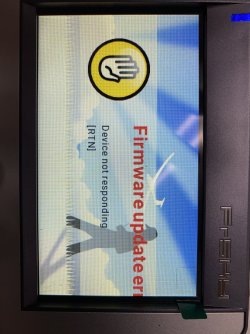
Thank you for your help. I did exactly what you said above. When I entered the flash command, I got the error message "Firmware update err." "Device not responding". [RTN}.
Any further suggestions?
Raymond Gaskins
 
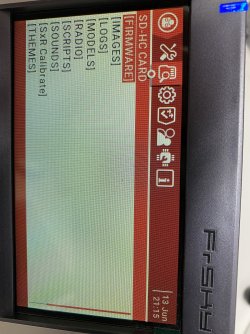
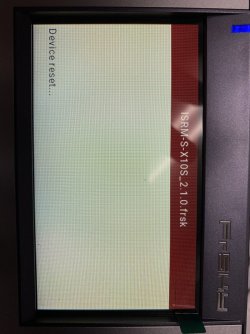
Can you publish an image of the flash command screen. Did you unzip the file I sent you.

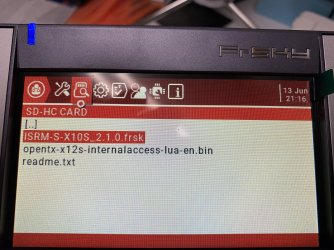
The file for flashing is the one labelled ISRM-S-X10S_2.1.0.frsk
 
Can you publish an image of the flash command screen. Did you unzip the file I sent you.

The file for flashing is the one labelled ISRM-S-X10S_2.1.0.frsk
I did unzip the file and it appeared in the unzipped fashion as above.
I will send a picture of the flash command screen from my iphone in just a minute.
RG
 
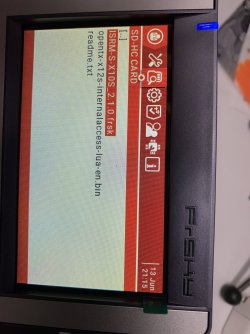
Here are the photos as attachments:
RG
B7DCBC44-4315-4ED0-8DB7-0D24C86D3D7B.jpeg
 

Attachments

  • EEE80576-4AAD-4731-91AB-17EDBB88EDAA.jpeg
    EEE80576-4AAD-4731-91AB-17EDBB88EDAA.jpeg
    420 KB · Views: 262
  • 923D8164-2702-4744-8C44-6CAEA4D6DDED.jpeg
    923D8164-2702-4744-8C44-6CAEA4D6DDED.jpeg
    612 KB · Views: 238
  • 2848F543-35C6-4778-A1E5-4686147A59EF.jpeg
    2848F543-35C6-4778-A1E5-4686147A59EF.jpeg
    526.5 KB · Views: 206
  • 1AD08F85-ECCC-45AA-8437-B75A571CFD81.jpeg
    1AD08F85-ECCC-45AA-8437-B75A571CFD81.jpeg
    523.8 KB · Views: 223
  • E4A379A8-C417-4509-9258-326A7C863B8F.jpeg
    E4A379A8-C417-4509-9258-326A7C863B8F.jpeg
    473.1 KB · Views: 229
  • D291DF6B-2EEB-4191-BC14-45954B422284.jpeg
    D291DF6B-2EEB-4191-BC14-45954B422284.jpeg
    508.1 KB · Views: 247
By any chance to you have an external module plugged in the rear module bay. If so remove it and try again.
 
Wayne do you have another version of the internal ISRM module firmware type v2.1.0 for the X12S radio????
 
I am unable to help you any further maybe time to contact HorusRC. Its strange because the HorusRC web site states they ship the X12S with ISRM and Ethos already flashed to it. So your radio arrived with FRos something strange is going on.

One last suggestion, does your radio give you options in selecting different antennas. I noticed the X12S ISRM radio comes with the Infinity Antenna, maybe try selecting what options are available in OTX.

Henny
 
Back
Top