What's new
Aloft Forums

Welcome to Aloft Forums. Register a free account today to become a member! Once signed in, you'll be able to participate on this site by adding your own topics and posts, as well as connect with other members through your own private inbox!

Factory reset needed on new TX16S, OpenTX 2.3.9

Mazeppa

Active User
Somehow while trying to get my 1rst model setup (for a Pilot Jasmine), I managed to scramble the channel order in a seemingly unique manner. Actual servo movement (by channel number) are not the same as are indicated on the output screen.
Repeated attempts to get Companion to "see" my radio have been unsuccessful. Tried computer with Windows 7, then one with Windows 10, different cables, crossing my fingers......

Would like to start all over from factory default settings, can this be done from the radio controls?
 
There are several ways to assign the channels, and a couple of ways to reassign them at the receiver..

Probably best to start a new model program. Can’t help you with the radio to computer issue, we don’t work with that radio, sorry.
 
The MPM (MultiProtocol Module) firmware includes features to map the channels for different protocols. As such, it also may be set to expect a particular channel order from the Tx, and/or be set to do a default conversion.
Remember that the MPM firmware is not written by RM, it is an open source project, originally for a DIY module. You will need to investigate what firmware you have on the MPM, and what channel mapping is configured, or compile the firmware with the options you require yourself and update the module.
There may be a ready built version available, start here: https://www.rcgroups.com/forums/showthread.php?2165676-DIY-Multiprotocol-TX-Module

Mike
 
There are several ways to assign the channels, and a couple of ways to reassign them at the receiver..

Probably best to start a new model program. Can’t help you with the radio to computer issue, we don’t work with that radio, sorry.
Tried new models, always the same scrambling of channels between the outputs of the radio (as seen on the output page) and actual from the receiver which indicates an error in general radio settings, but I cannot find it.
Could be in over my head here. Always managed er9x in my Turnigy 9x radio okay, but I connected the battery backwards and the magic smoke came out which led me to try a Radiomaster.

Sigh
 
The MPM (MultiProtocol Module) firmware includes features to map the channels for different protocols. As such, it also may be set to expect a particular channel order from the Tx, and/or be set to do a default conversion.
Remember that the MPM firmware is not written by RM, it is an open source project, originally for a DIY module. You will need to investigate what firmware you have on the MPM, and what channel mapping is configured, or compile the firmware with the options you require yourself and update the module.
There may be a ready built version available, start here: https://www.rcgroups.com/forums/showthread.php?2165676-DIY-Multiprotocol-TX-Module

Mike
Whew! took a peek in that link, looks to be well over my head.
Thanks for the reply, though.
 
What firmware are you using on the TX16? erskyTx (er9x for ARM processors) is available for the TX16S. There is even the possibility of converting (most of the settings of) er9x models to the erskyTx structure.

Mike
 
OpenTX 2.3.9 that came installed on the radio when purchased from racedayquads.com. Mine is the TX16S Max, if that makes any difference. My understanding is that what makes it a Max are largely cosmetic, with a higher quality display and slider pots.

erskyTx sounds interesting, but isn't such a move precluded by my inability to get a computer to recognize my TX16S?

Just tried the T1, T4 pressed in while powering up to get the radio in bootloader. Options that come up onscreen are Write Firmware, Exit, and Plug in USB cable for mass storage.
When Plug in USB cable is selected, Companion open on computer, radio display says "USB connected" when cable is attached, but radio still does appear in My Computer, or in Companion.
At least my cable is good, yes? That would eliminate one possible problem.
When Write Firmware is selected 2 options appear; multi-stm....... and a bluetooth file appear. I didn't monkey around any more than that, but can a reset to factory default be done in there?
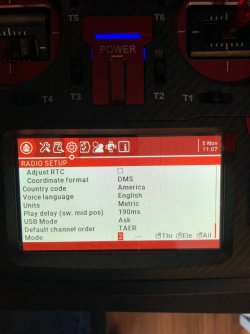
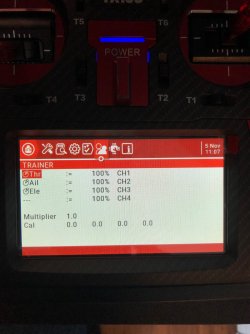
Th reason I want to try a factory default is illustrated in the attached photos. My motto has long been to fix what doesn't look right even if I don't see the connection between it and the problem(s) I'm pursuing. Note that there is no icon for the rudder stick. Have not been able to find a place where I have the option to add rudder stick to that location. IMG_1494.jpgIMG_1495.jpg

Do believe you helped me via openrcforums when I was 1rst getting into er9x, putting the smartieparts boards in my Turnigy 9x's and all of that a few years back.
Still trying to help us analog guys along in the digital era, eh? God bless you for that.
 
I'm still using the openTx bootloader (2.3.9). When in the bootloader, as you expect, when you plug the USB into the (top) USB connector you should see two drives appear on your computer. The display of "USB connected", this means the radio is seeing the power from the USB. Make sure you push the USB plug in firmly, the power connects before the signals. It does need a firm push to "click" into place.

Are you using the cable that came with the Radio?

Flashing erskyTx is possible. You just need to put the .bin file on the SD card, in the "FIRMWARE" directory, then it will appear in the bootloader display under "Write Firmware". However, without the computer connection, you are unable to backup the existing firmware, or settings.

Your second image above is the TRAINER setup, not the internal module setup.

I just checked in companion 2.3.9, and the internal module settings includes an option to disable the module channel mapping.
On the radio, from the main screen press the MDL button. Now scroll down through the options to the module setup values. One of these is "Disable Ch Map". Tick this option, then see if you channels now work correctly.

Mike
 
Back
Top